
If you’ve spent any time researching Meta Pixel or GA4 setup, you’ve probably run into the phrase “server side tracking recovers lost data.” It’s often pitched as the fix for every tracking problem — but the explanations rarely clarify what “server side” actually means, or whether you need it at all.
This guide breaks down the real difference between browser-side and server side tracking, why browser-side tracking loses data in the first place, and what server side tracking does — and doesn’t — fix.
What Is Browser-Side (Client-Side) Tracking?
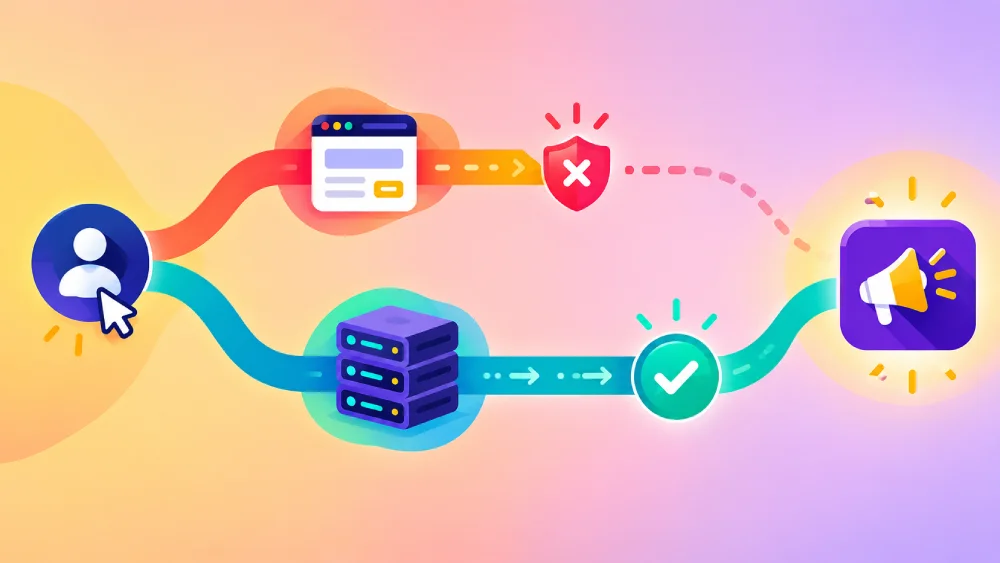
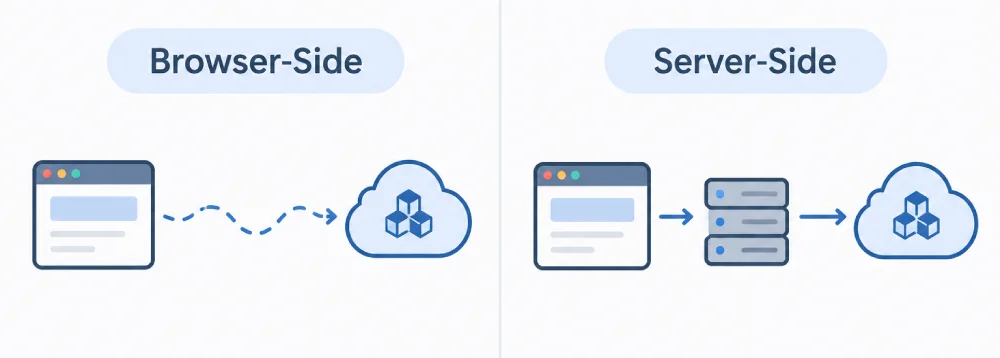
Browser-side tracking — also called client-side tracking — is what most tracking setups use by default. A script runs directly in the visitor’s browser: the Meta Pixel’s JavaScript, GA4’s gtag.js, or a Google Tag Manager container. When a visitor does something meaningful, that script fires an event and sends it straight from their browser to the platform’s servers.
The entire chain — detecting the action, building the event, and sending it — happens on a device you don’t control, inside a browser you don’t control, over a connection the visitor can interfere with. That’s both the appeal (it’s simple to set up) and the weakness (it depends on conditions outside your control to work correctly).
What Is Server Side Tracking?
Server side tracking moves that last step off the visitor’s browser. Instead of the browser sending the event directly to Meta or Google, your own website’s server sends it — usually after the browser (or a first-party process) tells your server what happened.
For Meta specifically, this is done through the Conversions API (CAPI). For Google, a similar concept exists through server side Google Tag Manager and the Measurement Protocol. In both cases, the event travels server-to-server rather than browser-to-server for at least part of its journey, which removes some — not all — of the points where a browser can interfere with it.
Server side tracking is a genuinely more advanced setup: it typically requires either a cloud function, a server side GTM container, or backend code that talks directly to the ad platform’s API — meaningfully more infrastructure than dropping a Pixel ID into a plugin’s settings field.
The Core Difference in One Table
| Browser-Side Tracking | Server Side Tracking | |
|---|---|---|
| Where the event originates | Visitor’s browser | Your website’s server |
| Setup complexity | Low — a plugin or a code snippet | Higher — backend integration or server side GTM |
| Affected by ad blockers | Yes | No (for the server-to-platform leg) |
| Affected by browser privacy features (ITP, etc.) | Yes | Reduced, but not eliminated |
| Typical cost | Usually free (plugin-based) | Often requires paid hosting/cloud functions |
| Data available | Whatever the browser can see | Can enrich with server-known data (e.g. order details) |
Why Browser-Side Tracking Loses Data (Ad Blockers, ITP, iOS 14+)
Browser-side tracking depends on the tracking script actually loading and executing in the visitor’s browser, uninterrupted, every time. Several common conditions break that chain:
- Ad blockers and privacy extensions — many block requests to known tracking domains (including Meta’s and Google’s) outright, so the event never leaves the browser.
- Safari’s Intelligent Tracking Prevention (ITP) — restricts and expires first-party and third-party tracking data more aggressively than other browsers, shrinking how long a visitor can be reliably recognized.
- iOS 14+ App Tracking Transparency — since Apple introduced its opt-in prompt for cross-app tracking, a large share of iOS users decline tracking by default, which affects tracking initiated from within apps and has ripple effects across the wider ad ecosystem.
- Network interruptions — a visitor closing the tab or losing connection right after a purchase, before the browser-side event finishes sending, means it may never arrive at all.
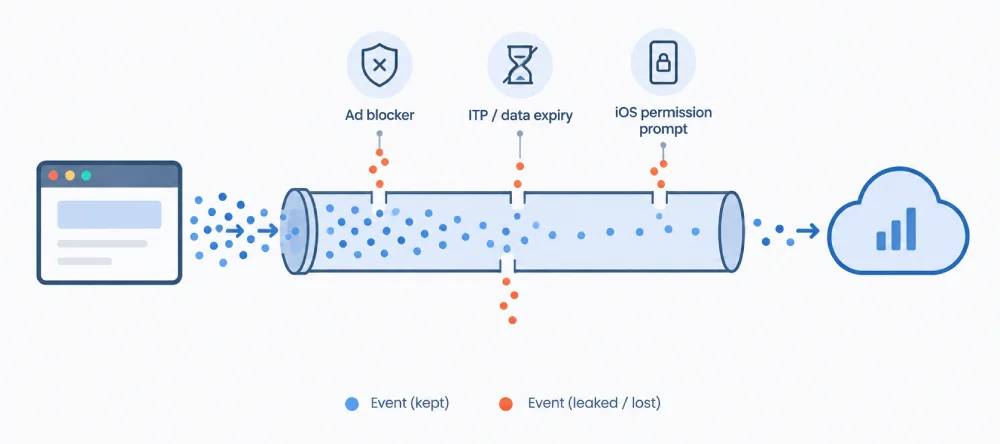
None of these are edge cases anymore. Depending on your traffic mix, a meaningful percentage of real conversions can go unrecorded through browser-side tracking alone — which is the entire reason server-side tracking exists as a concept.
What Server Side Tracking Fixes — and What It Doesn’t
Server side tracking is genuinely effective against some of the problems above — but it’s not a universal fix, and it’s worth being precise about the line.
What it fixes: Since the server-to-platform leg of the journey doesn’t run in the visitor’s browser, it’s immune to ad blockers and unaffected by ITP’s restrictions on that leg specifically. It can also enrich events with data your server already has — like exact order totals — without relying on the browser to relay it correctly.
What it doesn’t fix: Server side tracking still needs to know an event happened in the first place. In most implementations, that initial trigger still comes from the browser (a form submit, a page load) or from your server’s own order-processing logic — so if the underlying action itself is never detected, server side tracking has nothing to report. It also doesn’t restore data Apple’s App Tracking Transparency prevents at the device level, and it doesn’t make consent requirements optional — a visitor who declines tracking consent should still not be tracked, regardless of which architecture you use.
Do You Need Server Side Tracking Yet?
For most small and mid-sized WooCommerce stores, the honest answer is: get browser-side tracking fully correct first. In practice, most “missing conversions” problems on stores this size trace back to browser-side issues that have nothing to do with ad blockers — caching plugins serving stale thank-you pages, consent banners misconfigured to block scripts permanently, duplicate Pixel installs, or events simply never being mapped to the right WooCommerce action in the first place.
Server side tracking is worth the added infrastructure once you’ve confirmed your browser-side setup is clean and you’re still seeing a meaningful, consistent gap between your ad platform’s numbers and your actual WooCommerce orders — not before. Jumping to a more complex architecture doesn’t help if the simpler layer underneath it is still misconfigured.
How PixLedger Fits In Today (Browser-Side) and What’s Planned
PixLedger today is a browser-side tracking plugin — it handles Meta Pixel, GA4, and Google Tag Manager events fired from the visitor’s browser, mapped correctly to WooCommerce’s actual actions (AddToCart, InitiateCheckout, Purchase, and more).
Where PixLedger differs from most browser-side plugins is visibility into that layer: every event it fires is logged locally in your WordPress database in real time, with its exact payload and a status — sent, failed, or blocked by consent. Before reaching for server side tracking to “recover lost data,” this lets you actually see how much data your current browser-side setup is or isn’t capturing, and why — which is the diagnostic step most store owners skip entirely.
Pro Tip: Before assuming you need server side tracking, check your Event Log for the actual ratio of “sent” to “failed” or “blocked by consent” events over a normal week. If the vast majority of your events are already sending successfully, your real conversion gap is more likely coming from something else — like view-through attribution differences or a consent banner over-blocking — than from ad blockers alone.
Frequently Asked Questions
What is the difference between server side and client-side tracking?
Client-side (browser-side) tracking sends event data directly from the visitor’s browser to a platform like Meta or Google. Server side tracking sends that data from your own website’s server instead, which makes it unaffected by ad blockers and less affected by browser privacy restrictions on the server-to-platform leg of the journey.
What is server side tagging?
Server side tagging refers specifically to running a Google Tag Manager container on a server you control, instead of in the visitor’s browser. Tags configured in that container process and forward event data from your server rather than the client, which is one common way to implement server side tracking.
Does server side tracking replace the Meta Pixel or GA4 entirely?
No. Meta explicitly recommends running the browser-side Pixel and server side Conversions API together, since they can deduplicate matching events and cover each other’s gaps. Server side tracking is typically additive to browser-side tracking, not a replacement for it.
Is server side tracking harder to set up than browser-side tracking?
Generally, yes. Browser-side tracking on WooCommerce can be handled by installing a plugin and entering a few IDs. Server side tracking typically requires either a server side Google Tag Manager container, a cloud function, or custom backend code that communicates directly with the ad platform’s API — meaningfully more setup and ongoing maintenance.
Start with reliable browser-side tracking and full event visibility. Install PixLedger free from WordPress.org and see exactly which events are firing — and which aren’t — before deciding whether server side tracking is your next step.
Leave a Reply
You must be logged in to post a comment.