
MentoFeed
Live Product Feeds for WooCommerce. Always Fresh. Always Yours.
WooCommerce, Product Feed
Most feed plugins generate a static file once and serve the same stale copy to everyone. MentoFeed works differently — every time a partner, affiliate network, or price comparison portal fetches your feed URL, it gets the latest data directly from your WooCommerce database. No cron jobs. No cached files. No outdated prices. Build your exact column structure with a drag-and-drop builder, apply granular filters, protect every feed with a unique auth token, and monitor every access in the built-in log. Full control. Zero compromise.
Know exactly who fetched your feed and when.
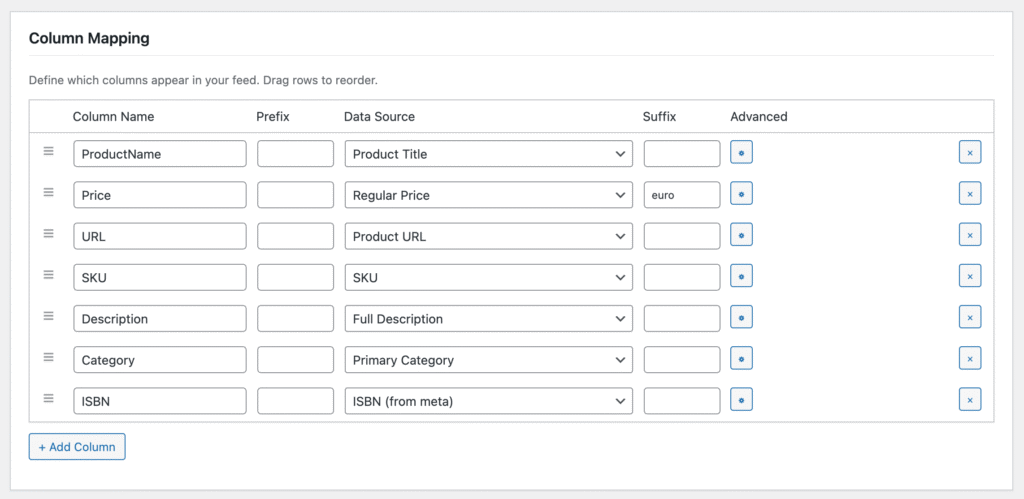
Other feed plugins force you into their template — you pick a channel and hope the fields match. MentoFeed gives you a blank canvas. Add as many columns as you need, name them anything you want, and map each one to the right data source from 50+ options. Drag rows to reorder. Add inline prefix or suffix per column — no code needed. Apply transformers like Strip HTML, Truncate, Number Format, or Find & Replace directly in the column row. If your affiliate network asks for something specific, you can build it. Exactly.
Every request hits your database. Not a cache.
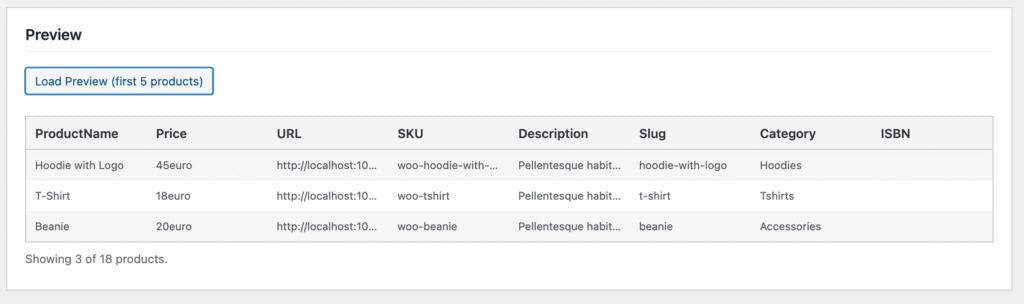
When a partner fetches your feed, MentoFeed queries your WooCommerce database in real time and streams the result directly as CSV or TSV. Price changed an hour ago? Already in the feed. Product went out of stock? Gone from the feed. No cron schedule to configure, no static file to manage, no risk of serving stale data. Your feed is always a live snapshot of your store — the moment it is requested. For German Excel users, enable UTF-8 BOM and semicolon separator — umlauts display correctly without any manual import steps.
Your feed. Your columns. Your rules.
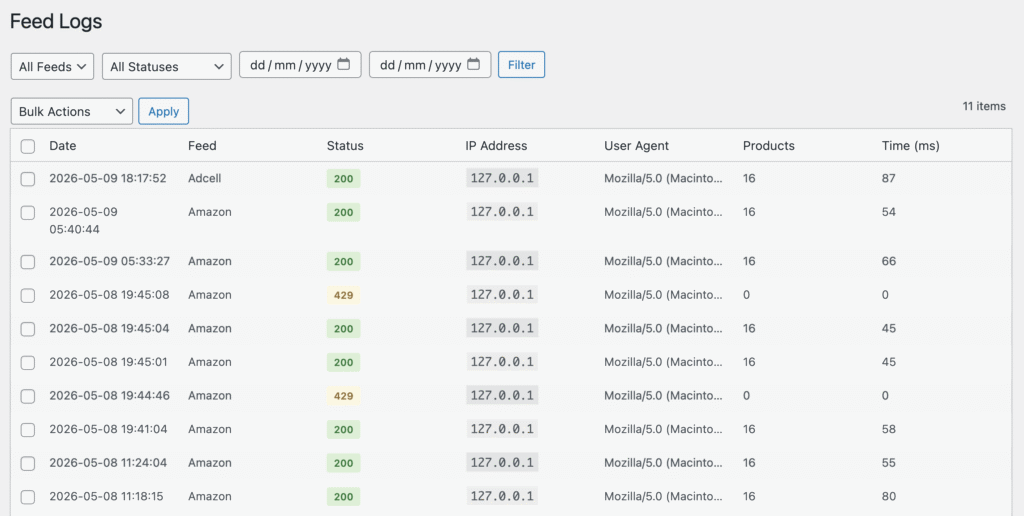
Every request to every feed is logged — timestamp, IP address, user agent, HTTP status, product count, and generation time in milliseconds. Filter by feed, by status code, by date range. Bulk delete old entries. If a partner is polling too aggressively, MentoFeed’s per-IP rate limiter blocks excessive requests automatically. You set the limit and the reset window. No server overload. No surprise traffic spikes. Just clean, controlled access with a full audit trail.
Manage multiple feeds from one clean dashboard.
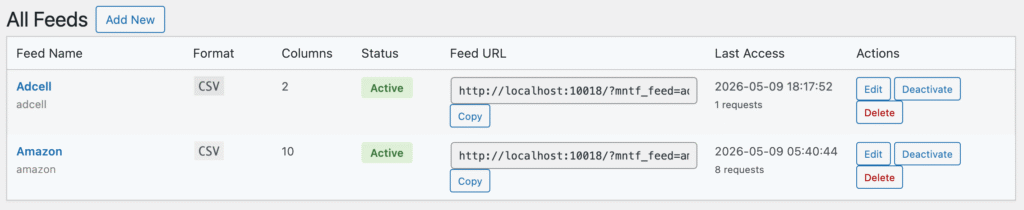
Run separate feeds for Google Shopping, idealo, Awin, Amazon, and your B2B partners — all from a single WordPress admin screen. Each feed profile has its own slug, its own auth token, its own column structure, its own filters, and its own output format. Activate or deactivate any feed instantly. Copy the feed URL with one click and share it directly with your partner. See last access time and total request count at a glance. Everything is self-contained — changing one feed never affects another.
Real problems. Real answers.
Here is what MentoFeed solves out of the box.
SCENARIO 01 · STALE DATA PROBLEM
Your feed shows €49. Your store says €39. Your partner is angry.
Price updates, flash sales, and stock changes happen constantly. Feed plugins that run on a cron schedule — every hour, every night — leave a gap where your feed data is simply wrong. Customers click through from idealo or Google Shopping and land on a different price. That kills trust and conversion.
How MentoFeed solves it:
- Open MentoFeed → Edit Feed
- No cron setting to configure — there is none
- Every fetch → live query → current price, current stock
- Share the feed URL with your partner
Your feed is always accurate to the second it is fetched.
0
scheduled cache
Always
real-time
Zero configuration
SCENARIO 02 · PARTNER COMPATIBILITY PROBLEM
Your affiliate network wants columns your plugin doesn’t support.
AdCell wants deeplink. Awin wants aw_deep_link. Your B2B partner wants EAN and Grundpreis. Template-based feed plugins give you what they decided to support. Everything else requires a developer, a custom transformer plugin, or a spreadsheet workaround.
How MentoFeed solves it:
- Open MentoFeed → Add New
- Click + Add Column → name it anything
- Pick your data source from 50+ options including custom meta fields
- Add prefix, suffix, or transformer if needed
- Done — export exactly what your partner expects
No developer. No workaround. Just the right columns.
50+
data sources
Unlimited
columns
Custom meta field support
SCENARIO 03 · FEED SECURITY PROBLEM
Your competitor is scraping your entire product catalog every hour.
A publicly accessible feed URL with no protection is an open invitation. Competitors scrape your prices. Bots hammer your server. You have no idea who is accessing your feed or how often. Some feed plugins offer no protection at all — just a plain URL anyone can hit.
How MentoFeed solves it:
- Every feed gets a unique auth token in the URL — without it, 403
- Configure per-IP rate limiting under MentoFeed → Settings
- Set max requests per window (e.g. 30 per hour)
- Check Feed Logs to see every access with IP and user agent
- Deactivate a feed instantly if abuse is detected
Full control over who accesses your data and how often.
Token-based
auth on every feed
Rate limiting
Per-IP
Full access log
SCENARIO 01 · DACH MARKET PROBLEM
German Excel opens your CSV and turns every umlaut into garbage.
This is a daily frustration for DACH merchants. German Excel (Windows) expects a semicolon separator and a UTF-8 BOM at the start of the file. Without the BOM, ä, ö, ü, and ß display as garbled characters. Most feed plugins ignore this completely and leave merchants to fix it manually — every time.
How MentoFeed solves it:
- Open MentoFeed → Edit Feed → Output Settings
- Set separator to Semicolon
- Enable UTF-8 BOM
- Save and fetch — German Excel opens it perfectly
Built for DACH merchants from day one. Grundpreis, Lieferzeit, and EAN fields included.
UTF-8
BOM support
Semicolon separator
Grundpreis & EAN fields built in